

How does the customer order from the table with a QR code?
Customer Experience at the Table
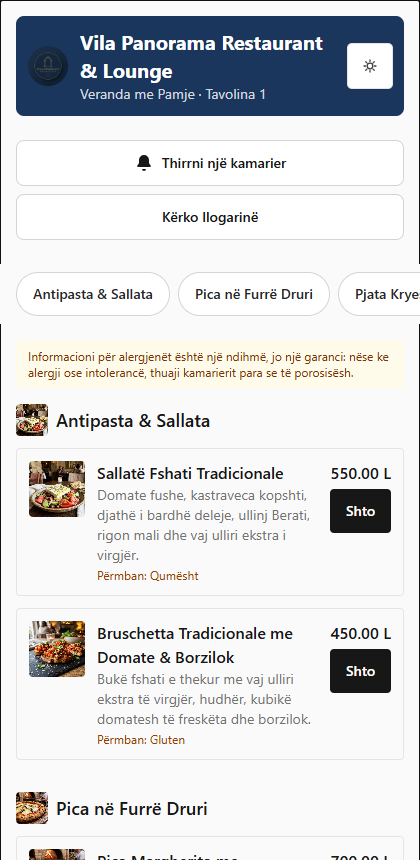
BletaGo eliminates physical paper menus and long waits for the waiter. Each table has a unique QR code that connects the customer's phone directly to that table in the system.
Ordering Steps:
-
Scan the QR Code:
- Open the camera app on your mobile phone (iPhone or Android).
- Point the camera at the QR code attached to the table (e.g. Table 1 in Veranda with a View).
- Tap the notification that appears on the screen to open the menu in the browser.
-
Language and Currency Selection:
- At the top of the page you can select your language flag (Albanian, English, Italian).
- Choose your preferred currency (Lek ALL or Euro EUR). Prices are converted instantly according to the restaurant's official daily exchange rate.
-
Menu Exploration:
- The menus are divided into clear categories: Antipasti & Salads, Wood Oven Pizza, Main & Grilled Dishes, Traditional Desserts.
- Each dish is accompanied by high-quality photographs, a description of the fresh ingredients, and a declaration of allergens (e.g. Gluten, Milk/Lactose, Eggs).
-
Add to Cart:
- Press the + Add button on the desired dish (e.g. Traditional Village Salad or Margherita Pizza with Mozzarella Di Bufala).
- The cart will update in the bottom bar of the screen.
Tip: You don't need to register or download any apps from the App Store or Google Play. The entire procedure happens in your phone's browser in a matter of seconds.